
If you’ve ever dreamed of creating your own game, you know that visuals can make or break the experience. That’s why selecting the best 3D design tools for games is critical. These tools help you design characters, environments, props, and textures that truly bring your game to life. Whether you’re an indie developer or an aspiring professional, understanding which software to use, their features, and workflows will give you a head start.
In this guide, we’ll break down the most powerful 3D design tools, explore what makes them special, and help you decide which fits your needs.
1. Blender – Free, Open-Source, and Highly Versatile
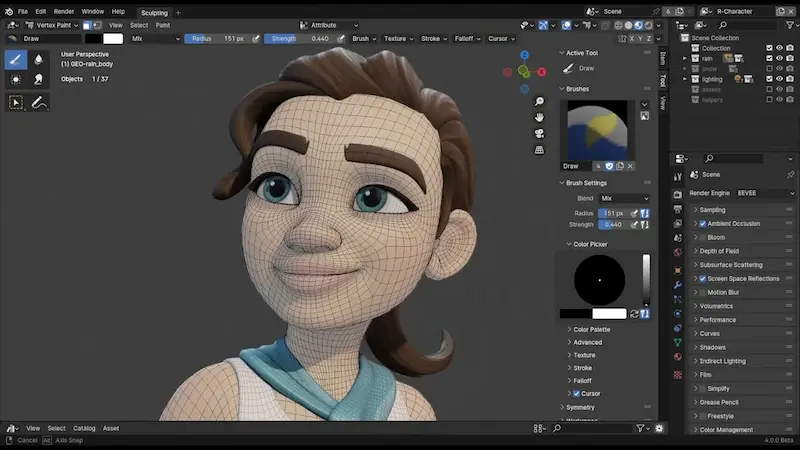
Blender has quickly become a favorite for both beginners and professionals. Why? Because it’s free, open-source, and incredibly powerful. Blender allows you to model, sculpt, animate, texture, and even edit video—all in one tool.
Key Features for Game Designers:
- Modeling: Blender provides a robust set of polygon and sculpting tools, allowing you to create anything from simple props to complex characters.
- Animation: The software supports rigging, keyframe animation, and even motion capture integration.
- UV Mapping and Texturing: Blender allows you to unwrap models and paint textures directly on them.
- Game Engine Integration: Export your models in formats compatible with Unity, Unreal Engine, or Godot.
- Community Resources: With countless tutorials, free models, and add-ons, learning Blender has never been easier.
Who Should Use Blender: Beginners, indie developers, and those on a budget who want professional-quality results. Blender is versatile enough to handle everything from game concepting to final assets.
2. Autodesk Maya – The Industry Standard
When it comes to professional game development, Autodesk Maya is the go-to software in AAA game studios. Maya excels in creating complex characters, realistic animations, and cinematic-quality environments.
Top Features:
- Advanced Modeling: Polygonal, NURBS, and subdivision surfaces give designers incredible control over shapes.
- Rigging and Animation: Maya is known for its robust rigging tools, making character movement look fluid and natural.
- Simulation Tools: Create realistic cloth, hair, and particle effects that enhance gameplay immersion.
- Game Engine Export: Maya models can be imported into Unity and Unreal Engine seamlessly.
Who Should Use Maya: Professional animators, studios, or anyone aiming to create high-quality characters and cinematic experiences. It has a steep learning curve but offers unmatched precision.
3. Autodesk 3ds Max – Perfect for Environments
While Maya is best for character animation, 3ds Max shines when it comes to environment modeling and architectural visualization. Game developers often use it to build detailed landscapes, buildings, and urban spaces.
Why 3ds Max is Excellent:
- Modeling Tools: Efficient for high-poly and low-poly models, ideal for large-scale game environments.
- Rendering: Integrated with Arnold and V-Ray for realistic rendering and lighting previews.
- Plugins: Extensive plugin ecosystem to enhance workflow, including terrain generators and procedural modeling tools.
- User Interface: Intuitive for architectural modeling but versatile enough for game design.
Who Should Use 3ds Max: Developers focused on environmental assets or large worlds, such as open-world games or realistic simulations.
4. ZBrush – Sculpting Mastery
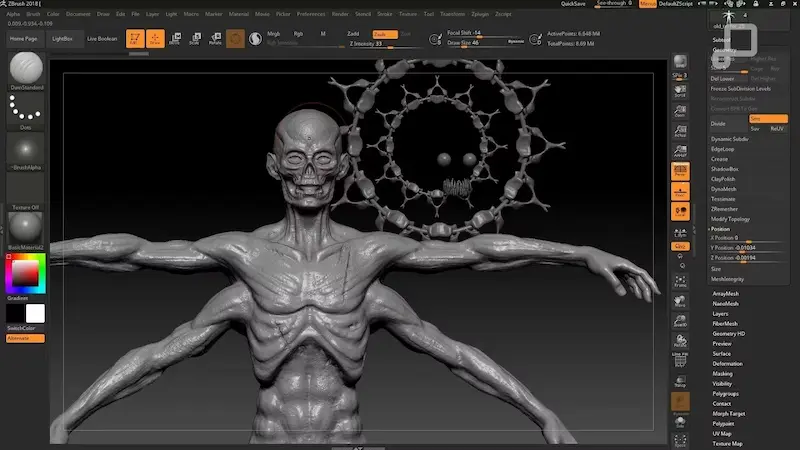
ZBrush is the ultimate sculpting software. It lets artists push the boundaries of detail with digital clay, creating characters, monsters, and props that are highly detailed and visually stunning.
Features for Game Development:
- High-Resolution Sculpting: Handle millions of polygons for intricate details.
- Dynamic Brushes: Paint and sculpt realistic textures, skin, and accessories.
- Integration with Game Engines: Models can be exported to Maya, Blender, or directly into Unity and Unreal.
- Retopology Tools: Optimize high-poly models for real-time game engines.
Who Should Use ZBrush: Character artists, monster designers, and anyone who wants to create highly detailed 3D assets.
5. Cinema 4D – Friendly Yet Powerful
If you’re new to 3D design, Cinema 4D is a fantastic option. Its intuitive interface makes learning easy, while its powerful animation and modeling tools are more than capable for game asset creation.
Key Advantages:
- User-Friendly Interface: Low learning curve compared to Maya or 3ds Max.
- Animation Tools: Supports keyframe animation, motion graphics, and simple rigging.
- Rendering: Fast and high-quality rendering for realistic previews.
- Integration: Works with Unity and Unreal for game-ready assets.
Who Should Use Cinema 4D: Beginners, motion graphics artists, and those who want a balance between ease of use and professional features.
You may also like to read this:
Best New 3D Games To Play In 2025 For Every Gamer
Trending 3D Games 2026 Review: Top Must-Play Titles
How Player Feedback on 3D Games Improves Gameplay
Beginner-Friendly Simple 3D Game Comparison Guide For 2025
Top Rated 3D Games This Year – Must-Play 2025 Titles
6. Substance Painter – The Go-To Texturing Tool
Even the best 3D models need textures to look realistic in-game. Substance Painter allows you to paint detailed textures directly onto your models, including PBR (Physically Based Rendering) materials for realistic lighting and reflections.
Why Substance Painter is Essential:
- Real-Time PBR Texturing: Materials respond accurately to lighting conditions.
- Layered Textures: Paint dirt, scratches, and wear for realism.
- Game Engine Ready: Export textures directly to Unity, Unreal Engine, and more.
- Efficiency: Non-destructive workflow lets you tweak textures without starting over.
Who Should Use Substance Painter: Any game designer or 3D artist focused on creating realistic or highly stylized textures for characters and environments.
7. Houdini – Procedural Power
For procedural environments, simulations, and complex visual effects, Houdini is unmatched. It’s widely used for generating massive terrains, destructible objects, and realistic simulations like smoke, fire, and water.
Highlights:
- Procedural Modeling: Create complex assets quickly using node-based workflows.
- Simulation Tools: Physics-based effects like explosions, water, and cloth.
- Integration: Houdini models and simulations can be exported to Unity, Unreal, and other engines.
- Flexibility: Ideal for both cinematic sequences and in-game assets.
Who Should Use Houdini: Experienced developers and studios focused on procedural content and advanced VFX.
Choosing the Right 3D Design Tool
Choosing the best 3D design tools for games depends on what you want to create and your level of expertise:
- Beginners: Blender or Cinema 4D
- Character Artists: ZBrush, Maya
- Environment Designers: 3ds Max, Houdini
- Texture Artists: Substance Painter
- AAA Game Developers: Maya + ZBrush + Substance Painter + Houdini
Most professionals use a combination of tools for the best workflow: modeling in Blender or Maya, sculpting in ZBrush, texturing in Substance Painter, and final integration in Unity or Unreal Engine.
FAQs About 3D Design Tools for Games
Q1: Can free software like Blender compete with paid tools?
Absolutely! Blender is powerful enough for professional projects and widely used by indie developers worldwide.
Q2: Which software is best for realistic characters?
ZBrush for sculpting + Maya for rigging and animation is a common combo for lifelike characters.
Q3: Do I need a high-end PC for these tools?
For basic modeling, a mid-range PC works. High-poly sculpting, rendering, and simulations require powerful CPUs, GPUs, and RAM.
Q4: Can I learn multiple tools at once?
Yes, but focus on one at a time. Start with modeling in Blender or Maya, then move to sculpting in ZBrush or texturing in Substance Painter.
Q5: Which tools integrate best with Unity or Unreal Engine?
Blender, Maya, 3ds Max, ZBrush, Substance Painter, and Houdini all export assets compatible with Unity and Unreal Engine, making workflows smooth.
Conclusion
Selecting the best 3D design tools for games is crucial for building captivating characters, environments, and assets. Beginners can start with Blender or Cinema 4D, while professionals rely on Maya, ZBrush, and Substance Painter. By understanding the strengths of each tool and combining them effectively, you can create stunning, game-ready 3D models that elevate your project to the next level.
The world of game development is evolving rapidly, and the right tools will give you the creative freedom to turn your ideas into playable, immersive experiences.