

If you’re new to game development and want to dive into the world of 3D games, starting small is key. That’s why we’re focusing on simple 3D game design ideas that anyone can try. You don’t need a huge team or advanced coding skills to get started—just curiosity, some creativity, and a willingness to learn.
In this guide, I’ll walk you through beginner-friendly game ideas, explain why they work, and give tips to make your first 3D project a success.
Why Start with Simple 3D Game Design Ideas?
Jumping straight into creating a massive 3D open-world game is tempting, but it’s a recipe for frustration. Simple 3D games are better because they:
- Help you understand core game mechanics like movement, collision, and scoring.
- Let you finish a project, which builds confidence.
- Teach you level design, lighting, and physics without overwhelming complexity.
- Allow you to experiment with style, theme, and storytelling in manageable chunks.
Now that you know why simplicity matters, let’s look at some beginner-friendly ideas.
Simple 3D Game Design Ideas for Beginners
1. Endless Runner
Think of classic games like Temple Run or Subway Surfers—but simpler. An endless runner keeps the player moving forward, dodging obstacles, and collecting points.
Why it’s beginner-friendly:
You only need a running character, obstacles, and a repeating environment.
Skills you’ll practice:
- Character movement and jumping mechanics
- Collision detection
- Object spawning
- Scoring and UI
Variations to try:
- A car or bike instead of a character
- A forest, desert, or futuristic city environment
- Adding power-ups or speed boosts
Tip: Start with one type of obstacle and one character ability, then gradually expand.
2. 3D Maze Escape
Create a maze for the player to navigate and reach the exit.
Why it’s simple:
The environment can be minimal and blocky. You don’t need enemies or complex AI for your first project.
What you’ll learn:
- Designing levels
- Player navigation and camera control
- Optional: adding AI for a chasing enemy
Fun variations:
- Time-limited escape
- Dark maze with a flashlight mechanic
- Hidden keys or collectibles that unlock doors
Tip: Use modular blocks to quickly build and test different maze layouts.
You may also like to read this:
How To Create 3D Games Online: Full Beginner Guide
Beginner Guide To Game Creation | Start Making Games Today
Learn Basic Game Development: Beginner-Friendly Guide
Beginner-Friendly Free Tools For Game Creation In 2025
3. 3D Platformer
Design a short platforming course where players jump between platforms, avoid hazards, or reach a goal.
Why it works for beginners:
Platforming teaches movement, gravity, and simple physics in an isolated environment.
What you’ll learn:
- Jump mechanics
- Moving and rotating platforms
- Simple hazard interactions
Add-ons:
- Collectibles or coins along the path
- Rotating or disappearing platforms
- Falling traps or spikes
Tip: Start with one level to focus on perfecting controls before adding more complexity.
4. 3D Shooting Gallery
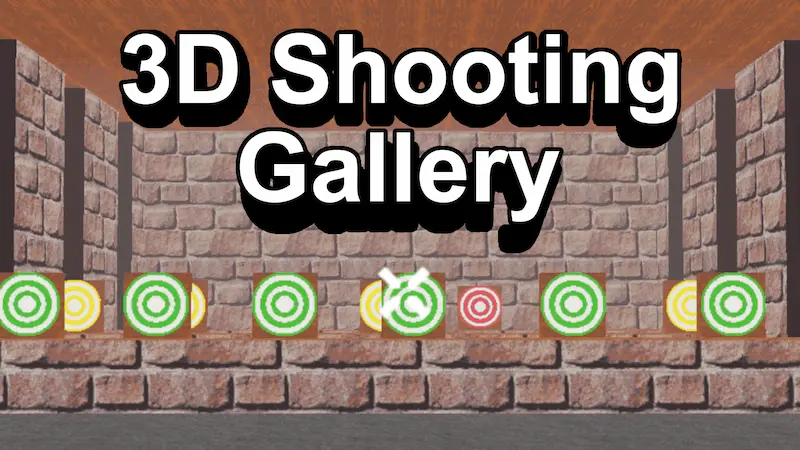
Set up targets in a small arena and let players hit them using a simple shooting mechanic.
Why it’s easy:
No enemy AI or complex mechanics—just aiming and shooting.
Skills learned:
- Raycasting or projectile shooting
- Target collision and scoring
- Sound effects and basic UI
Themes to try:
- Balloon popping
- Futuristic laser targets
- Magical spell casting
Tip: Experiment with different target sizes and speeds to make it more challenging.
5. 3D Obstacle Course
Build a short parkour-style course with jumps, slides, and moving blocks.
Why it’s effective:
It focuses on physics, timing, and player movement without adding complex story elements.
Skills gained:
- Rigidbody physics and gravity
- Player movement scripting
- Event triggers and timing
Variations:
- Lava floors or spikes
- Ice slides for slippery physics
- Low-gravity space environments
Tip: Make your course short but challenging—it’s better to complete a short level than to abandon a long one.
6. 3D Car Driving Game
A simple driving game can be both fun and educational. Design a small map and let players drive a car or other vehicle.
Why it’s simple:
Many engines have pre-made vehicle controllers, so you can focus on map design and gameplay.
What you’ll learn:
- Basic vehicle physics
- Camera follow mechanics
- Collision handling
- UI for laps or timers
Ideas to try:
- Time trials with checkpoints
- Obstacle courses with ramps and tunnels
- Off-road maps with low-poly terrain
Tip: Start with a small map and one vehicle, then expand with obstacles or challenges.
7. 3D Collect-the-Coins Game
Place coins or collectibles throughout a 3D environment and let players collect them.
Why beginners love it:
It’s simple, fun, and teaches fundamental interactions.
Skills gained:
- Trigger detection
- Score systems and UI updates
- Sound effects and animations
Creative themes:
- Treasure hunt on a pirate island
- Magical forest collection
- Snow mountains or cave adventure
Tip: Add a timer or limited lives to make it more exciting.
8. 3D Puzzle Room
Create a small room where players solve a puzzle to unlock a door or progress.
Why it’s beginner-friendly:
Limited space and a single mechanic makes it manageable for first-time developers.
What you’ll practice:
- Interactable objects
- Basic logic scripting
- Animations and effects
Puzzle ideas:
- Move boxes into specific positions
- Find hidden switches
- Rotate statues or levers
Tip: Keep the puzzle simple but satisfying—the goal is learning mechanics, not creating a masterpiece.
Tips for Beginners in 3D Game Design
- Start small: One mechanic, one level, one environment.
- Use free assets: Unity Asset Store, Unreal Marketplace, and sites like OpenGameArt are great for beginners.
- Focus on learning, not perfection: Your first 3D game is about understanding game development basics.
- Test often: Play your game after every small change to catch mistakes early.
- Iterate slowly: Add one feature at a time—avoid overwhelming yourself.
Conclusion
Creating 3D games doesn’t have to be intimidating. By starting with simple 3D game design ideas, you can focus on learning the essentials: movement, collision, physics, and level design. The key is to begin small, iterate often, and enjoy the process. Once you complete your first project, you’ll gain confidence and skills to tackle more advanced games.
Remember, even the biggest games started with a single simple idea. So pick one of these beginner-friendly concepts and start building today!
FAQs: Simple 3D Game Design Ideas
1. What is a simple 3D game design idea?
A simple 3D game design idea is a basic concept for a 3D game that is easy to create, usually with minimal mechanics and small environments. These ideas are perfect for beginners who want to practice skills like movement, collision, and level design.
2. Which software is best for beginners to create 3D games?
Some beginner-friendly software includes:
Unity: Great for both 2D and 3D games, with lots of tutorials and assets.
Unreal Engine: Powerful for 3D visuals and has a visual scripting system called Blueprints.
Godot: Lightweight and beginner-friendly with a simple interface.
Online platforms: Tools like Roblox Studio or CoSpaces allow simple 3D game creation without advanced coding.
3. Do I need coding knowledge to make a simple 3D game?
Not necessarily. Many engines like Unity and Unreal Engine allow visual scripting. However, learning basic programming (C# for Unity or Blueprint logic in Unreal) will give you more control and allow you to create more complex features.
4. How long does it take to make a simple 3D game?
It depends on the game’s complexity and your experience. A very simple project, like a coin collection or obstacle course, could be made in a few days to a week if you dedicate time regularly. More advanced ideas might take several weeks.
5. Can I use free 3D models in my games?
Yes! Many free assets are available on the Unity Asset Store, Unreal Marketplace, OpenGameArt, and Sketchfab. Free models can help you prototype your game quickly without creating everything from scratch.


