

Are you dreaming of creating your own video games but worried about expensive software and complicated tools? Good news! You don’t need to spend hundreds—or even thousands—of dollars to start building your games. With free tools for game creation, you can design, develop, and even publish games without breaking the bank.
Whether you’re a complete beginner or an aspiring indie game developer, these tools provide everything you need to bring your ideas to life. In this guide, we’ll explore the best free software, their features, and tips to get started.
Why Use Free Tools for Game Creation?
You might be wondering, “Why should I choose free tools?” Here’s why:
- Cost-effective: You don’t have to invest heavily upfront.
- Beginner-friendly: Many free tools have tutorials, templates, and visual scripting options.
- Flexibility: Experiment with 2D or 3D games without commitment.
- Community support: Most free tools have large communities that share assets, tutorials, and tips.
- Scalable: Start with simple games and expand into complex projects as you gain experience.
Now, let’s dive into the top free tools that make game creation accessible for everyone.
1. Unity – The Versatile Game Engine
Unity is one of the most widely-used game engines in the world, powering both indie and AAA games. The Unity Personal Edition is completely free and ideal for beginners.
Key Features:
- 2D & 3D support: Create anything from simple platformers to immersive 3D worlds.
- Asset Store: Access thousands of free assets, including characters, environments, and textures.
- Cross-platform export: Release games on Windows, macOS, Android, iOS, and more.
- Visual scripting: Unity’s Bolt plugin allows you to create logic without coding.
Why Choose Unity:
If you want flexibility and room to grow, Unity is a perfect choice. Start small with simple games and gradually learn more advanced features as you progress.
2. Unreal Engine – Stunning Graphics Made Accessible
Unreal Engine is famous for its high-quality graphics and is widely used in AAA games. The engine is free to use, and you only pay royalties once your game earns revenue.
Key Features:
- Blueprint visual scripting: Build complex gameplay without writing code.
- Photorealistic rendering: Ideal for 3D adventure or action games.
- Marketplace assets: Download free models, textures, and templates to speed up development.
Why Choose Unreal Engine:
If your goal is a visually impressive 3D game and you don’t mind a steeper learning curve, Unreal Engine offers the tools to create a professional-grade experience.
3. Godot Engine – Lightweight and Open-Source
Godot is a completely free, open-source game engine suitable for both 2D and 3D game development. It’s lightweight, fast, and flexible.
Key Features:
- Node-based system: Organize game objects easily.
- GDScript: Beginner-friendly scripting language similar to Python.
- Multi-platform export: Supports Windows, macOS, Linux, Android, iOS, and HTML5.
- No royalties or licensing fees: Completely free to use for commercial games.
Why Choose Godot:
Godot is ideal for indie developers and beginners who want a balance between ease of use and powerful features.
4. GameMaker Studio 2 – Simplified 2D Game Development
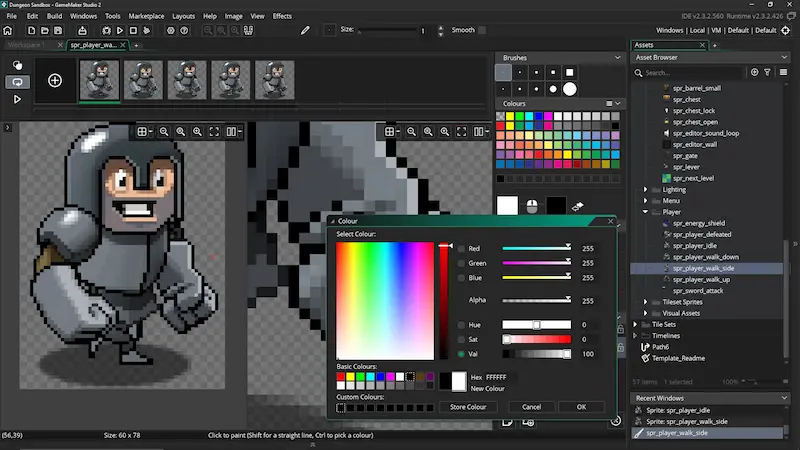
GameMaker Studio 2 is perfect for creating 2D games quickly. Its free trial version allows you to experiment with its features before committing.
Key Features:
- Drag-and-drop interface: No coding required for basic games.
- Built-in physics engine: Easily create realistic movements and collisions.
- Export to Windows: Free version supports Windows export; paid versions offer more platforms.
Why Choose GameMaker:
For beginners who want to create platformers, top-down shooters, or puzzle games, GameMaker provides an easy entry point.
5. Construct 3 – Browser-Based Game Engine
Construct 3 is a web-based game engine that requires no installation and is designed for beginners.
Key Features:
- Visual programming: Use blocks to create game logic without coding.
- Instant testing: Test games instantly in your browser.
- Export options: Export to HTML5, Android, iOS, desktop, and more.
Why Choose Construct 3:
It’s perfect for educators, students, or anyone wanting to build games quickly with minimal technical knowledge.
You may also like to read this:
How To Create 3D Games Online: Full Beginner Guide
Beginner Guide To Game Creation | Start Making Games Today
Simple 3D Game Design Ideas For Beginners To Start Creating
Learn Basic Game Development: Beginner-Friendly Guide
6. Blender – 3D Modeling and Asset Creation
Blender is not a game engine but an essential free tool for creating 3D models, animations, and textures. These assets can be imported into Unity, Unreal, or Godot.
Key Features:
- 3D modeling & sculpting: Create characters, objects, and environments.
- Animation tools: Animate characters and objects for games.
- Cross-compatibility: Export models in formats supported by most game engines.
Why Choose Blender:
Even if you don’t build the game engine, Blender lets you create professional-quality assets without spending money.
7. RPG Maker – Craft Your Own Role-Playing Games
RPG Maker is ideal for creating story-driven RPG games. The free trial version offers enough features to start experimenting.
Key Features:
- Pre-made characters and maps: Build worlds quickly.
- Event-based scripting: Control game events without coding.
- Customizable battles and storylines: Focus on creativity and storytelling.
Why Choose RPG Maker:
If you love RPGs and want to focus on storytelling and gameplay mechanics without complex coding, this is your go-to tool.
Tips for Making the Most of Free Game Creation Tools
- Start small: Begin with a simple project to learn the workflow.
- Follow tutorials: Free tools often have robust tutorials and documentation.
- Combine tools: Use Blender for assets, then Unity or Godot for game development.
- Test frequently: Playtesting helps you identify bugs and improve gameplay.
- Join communities: Platforms like Discord, Reddit, and YouTube have helpful game dev communities.
Conclusion
Creating games is no longer limited by budget. With free tools for game creation, anyone—from hobbyists to aspiring indie developers—can start building their dream games today. Whether you’re interested in simple 2D games, immersive 3D worlds, or storytelling RPGs, there’s a tool out there for you. Start experimenting, learn step by step, and who knows—you might create the next big hit!
FAQs
Q1: Are these free tools truly free?
Yes! They offer free versions or open-source access, perfect for beginners and indie developers. Some may have paid upgrades for advanced features.
Q2: Do I need coding knowledge?
Not always. Tools like Construct 3, GameMaker, and RPG Maker allow game creation without coding. Unity and Unreal offer visual scripting.
Q3: Can I sell games made with free tools?
Absolutely! Most free tools allow commercial use, but check individual licensing terms.
Q4: Which free tool is best for beginners?
Construct 3 and GameMaker are easiest for beginners. Unity and Godot are excellent for learning and growing as a developer.


