
Are you curious about creating 3D models but don’t know where to start? The good news is that online 3D model creator tools make 3D design accessible for everyone. Whether you’re a beginner, a hobbyist, or a professional designer, these tools let you create, edit, and visualize 3D objects directly from your web browser—without the need to install heavy software.
In this article, we’ll explore the best online tools, discuss their unique features, and provide practical tips to help you get started in 3D modeling. By the end, you’ll feel confident designing your own 3D models!
Why Choose Online 3D Model Creator Tools?
You might be wondering why you should use online tools instead of traditional 3D modeling software like Blender or Maya. Here’s why:
- No Installation Needed – Online tools run entirely in your browser, so you don’t need a high-end computer or extra storage.
- Easy to Learn – Most platforms offer intuitive drag-and-drop interfaces suitable for beginners.
- Accessibility Anywhere – Work on your projects from any computer or tablet with internet access.
- Collaborative Features – Many tools allow real-time collaboration, making it easy to work in teams.
- Quick Prototyping – Ideal for testing concepts or creating simple 3D designs without a steep learning curve.
These benefits make online 3D model creator tools perfect for educators, students, entrepreneurs, and designers who want a faster way to bring ideas to life.
Top Online 3D Model Creator Tools
Here’s a closer look at some of the most popular online 3D model creator tools, each with unique strengths:
1. Tinkercad
Tinkercad is a beginner-friendly tool developed by Autodesk. It’s great for those just starting with 3D modeling. You can easily combine shapes to create objects like toys, jewelry, or even small gadgets.
Key Features:
- Drag-and-drop interface for easy design
- Pre-built shapes that can be modified
- Free to use for personal and educational purposes
- Supports 3D printing, exporting models in STL or OBJ formats
Best For: Beginners, hobbyists, and educators teaching 3D modeling.
2. Vectary
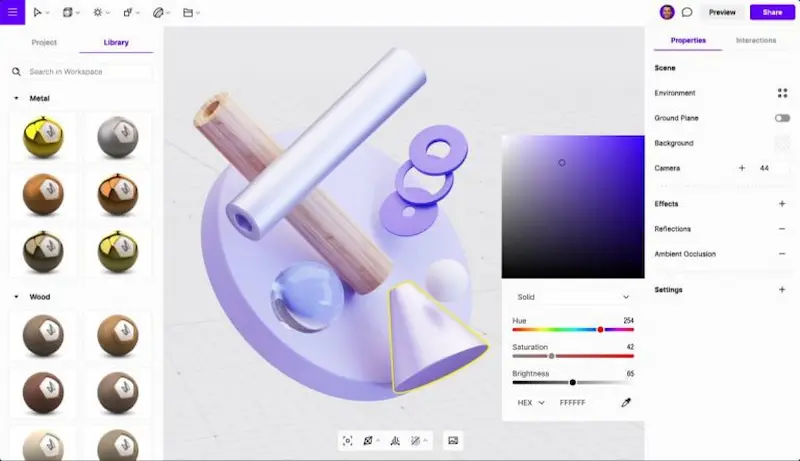
Vectary is an online 3D design platform that combines modeling with collaboration tools. It’s ideal for designers who want to create interactive and photorealistic visuals for marketing, web design, or presentations.
Key Features:
- Cloud-based, works in any browser
- Collaborative editing for teams
- Built-in templates for quick design
- Supports AR and 3D web content
Best For: Web designers, marketers, and teams needing collaborative 3D projects.
3. Sketchfab
Sketchfab is a platform for creating, viewing, and sharing 3D models online. It’s not just a modeling tool—it also serves as a showcase for 3D artists. You can animate models and even present them in virtual reality (VR).
Key Features:
- Real-time 3D viewer
- VR and AR support
- Community marketplace for buying and selling models
- Embed models on websites easily
Best For: Artists, content creators, and anyone looking to showcase 3D designs online.
4. Clara.io
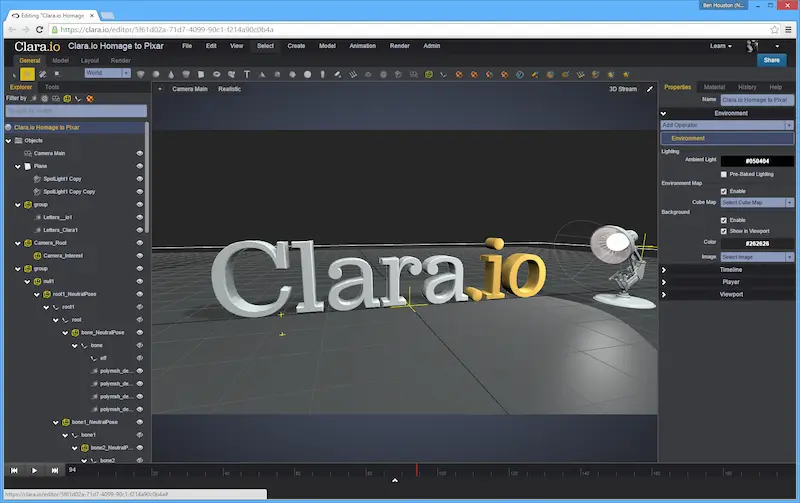
Clara.io is a professional-grade 3D modeling and rendering tool that runs fully in your browser. It’s perfect for users who need advanced features without installing software.
Key Features:
- Complete modeling, animation, and rendering capabilities
- Cloud storage to save and access projects anywhere
- Supports a wide range of file formats like OBJ, STL, and FBX
- Collaborative project sharing
Best For: Professional designers and students studying advanced 3D modeling.
5. SculptGL
SculptGL is a lightweight, browser-based 3D sculpting tool. If you enjoy creating detailed, organic shapes like characters or creatures, this tool is a great start.
Key Features:
- Dynamic sculpting brushes
- Supports mesh manipulation and painting
- Free and open-source
- Works directly in the browser
Best For: Artists interested in digital sculpting and character design.
You may also like to read this:
Top Rated 3D Games This Year – Must-Play 2025 Titles
Best 3D Design Tools For Games: Top Software In 2025
Free Software For 3D Modeling: Top Tools For Beginners
Best Tools For Animation And Game Design – 2025 Guide
Easy 3D Design Apps For Beginners – Start Modeling Today
Game Design Made Easy: How To Use Design Tools For Games
6. SelfCAD
SelfCAD is an all-in-one 3D modeling, sculpting, and printing tool that is beginner-friendly yet powerful enough for professional projects.
Key Features:
- Browser-based modeling with an easy-to-learn interface
- Integrated 3D slicer for 3D printing
- Tutorials and guides for beginners
- Free version available with basic tools
Best For: Beginners to intermediate users who want an all-in-one solution.
How to Start Using Online 3D Model Creator Tools
Getting started is simpler than you think. Follow these steps:
- Choose Your Tool – Beginners may prefer Tinkercad or SelfCAD, while advanced users may opt for Clara.io or Vectary.
- Sign Up – Create a free account to save and access your projects.
- Learn the Basics – Explore tutorials or demo projects to get familiar with the interface.
- Start Modeling – Use shapes, sculpting brushes, or templates to create your design.
- Export or Share – Save your model in formats like STL, OBJ, or share it online.
Tips for Better 3D Modeling
- Plan Your Design – Sketch ideas on paper first to visualize the final product.
- Use Templates – Start with templates to understand structure and workflow.
- Experiment Freely – Test different shapes, textures, and colors.
- Save Frequently – Online tools can sometimes lag or crash; don’t lose your work.
- Join Communities – Engage with other 3D designers for inspiration and feedback.
FAQs About Online 3D Model Creator Tools
Q1: Are online 3D model creator tools free?
Most tools offer free versions with basic features, but some advanced features may require a paid subscription.
Q2: Can I 3D print models created online?
Yes! Tools like Tinkercad, SelfCAD, and Vectary allow you to export models in STL or OBJ formats compatible with 3D printers.
Q3: Do I need a powerful computer to use these tools?
No, these tools run in your browser, so even standard computers can handle simple 3D modeling projects.
Q4: Can I collaborate with others online?
Yes, Vectary, Clara.io, and SelfCAD offer collaborative features to work with teams in real-time.
Conclusion
Online 3D model creator tools have made designing 3D objects easier than ever. Whether you’re a beginner wanting to experiment with 3D shapes, an educator teaching modeling, or a professional designer showcasing interactive projects, these tools offer something for everyone. Platforms like Tinkercad, Vectary, and Clara.io provide intuitive interfaces, collaboration options, and even 3D printing support, making 3D modeling more accessible than ever.
Start exploring today, experiment with different tools, and watch your ideas come to life in 3D!